Description
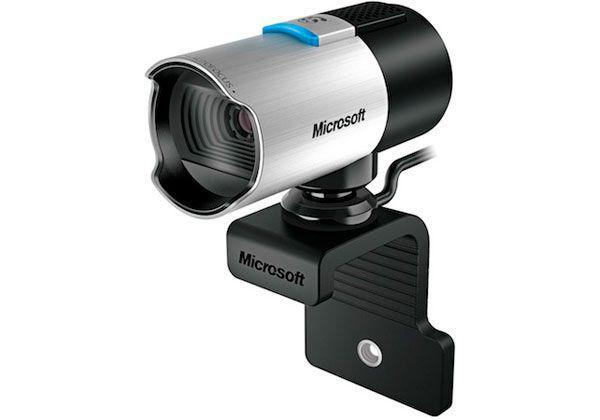
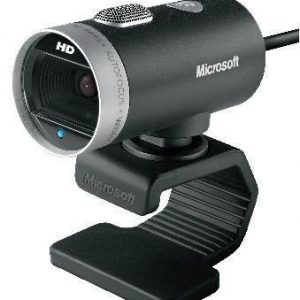
The Microsoft LifeCam Studio webcam is a sophisticated, feature-rich webcam that is designed to deliver high-quality video calls and content creation for professionals, gamers, and anyone else who requires superior video quality. It’s the perfect device for video conferencing, streaming, recording, and broadcasting, thanks to its advanced features and capabilities.
The Microsoft LifeCam Studio webcam provides 1080p Full HD video resolution, which is four times higher than the standard 480p resolution offered by most webcams. Furthermore, the camera lens is engineered with high-precision glass elements that provide sharp, crystal clear images.
This webcam also features TrueColor Technology, which automatically adjusts color and exposure to produce bright, vibrant, and natural-looking video in virtually any lighting condition. This feature ensures that you look your best during video calls, regardless of where you are.
Moreover, the Microsoft LifeCam Studio webcam comes with a high-quality microphone that reduces ambient noise to deliver crisp and clear audio. It also has a noise-cancelling feature that removes unwanted background sounds. This is particularly important for users who want to communicate effectively in noisy environments.
The Microsoft LifeCam Studio webcam is built with a 360-degree swivel mount, allowing users to easily adjust the camera angle to capture the perfect shot. It also has a long, flexible cable that allows you to position the webcam wherever you need it, making it a perfect tool for presentations, interviews, or live streams.
Another notable feature of the Microsoft LifeCam Studio webcam is its compatibility with Windows Live Movie Maker, which provides users with advanced video editing capabilities. With these tools, users can easily create high-quality videos and share them on social media platforms or video sharing sites.
Whether you’re a gamer, a professional, or just someone who wants high-quality video calls, the Microsoft LifeCam Studio webcam is the perfect device for you. With its advanced features and capabilities, you can easily produce crystal clear video and audio that will leave an impression on your audience.
Microsoft LifeCam Studio properties
| Product name | LifeCam Studio |
| Brand | Microsoft |
| Interface | USB |
| Max Video Resolution @ 30fps | 1920×1080 (Full HD) |
| Max Video Resolution | 1920×1080 pixels |
| Platform | Mac, Windows |
| Digital Zoom | 3 x |
| Features | Microphone |
| Max Frame Rate | 30 fps |
| Focus | Auto |
| Software included | No |
| Height | 113 mm |
| Width | 40 mm |
| Depth | 60 mm |
| Weight | 104 g |

Faith Hines –
Oh boy, oh boy! Where do I even begin with my epic tale of love, loss, and a life-changing decision that would ultimately lead me down a winding path of self-discovery? It all started back in January when my good friend Jameson Stout, who is actually a stoic fellow but the name just fits him so well, introduced me to the magical world of Webcams.
What if we were to bring our video calls to life? he asked with stars in his eyes. We could see each other’s faces, share our emotions, and be there for one another, no matter where we are. I was skeptical at first, but then again, who am I to deny a friend his dreams? So off to the store we went to find the perfect Webcam.
The journey wasn’t an easy one, mind you. We had to navigate the treacherous waters of Lawrence St #1200, Denver, CO 80202, United States, where a multitude of shiny objects and deceitful promises awaited us at every turn. But then, there it was: the Microsoft LifeCam Studio, glistening like a beacon in the night. I had seen this product for the first time right then and there, and I knew that our lives would never be the same.
Let me tell you, folks, I have used this Webcam on countless occasions since January, and it’s been quite the rollercoaster ride. Sometimes, it works flawlessly, capturing every nuance of my expressions as if my face was a masterpiece painted by the hand of a divine artist. Other times, it’s like trying to navigate a minefield with a blindfold on – you just never know what you’re going to get.
But that’s not to say that I regret my decision one bit. Life is full of surprises, and sometimes, those surprises come in the form of a three-star Webcam named Microsoft LifeCam Studio. If you’re thinking about making the leap into the world of Webcams yourself, here are some tips and tricks I’ve learned along the way:
1. Make sure your Webcam is properly aligned with your screen so that it captures your face from the perfect angle. Trust me, nobody wants to see a nostril close-up during a video call.
2. Lighting is key! You don’t want to look like a shadowy figure straight out of a horror movie. Set up some lamps or ring lights around you for that soft, warm glow that will make your face look as if it was chiseled by Michelangelo himself.
3. Invest in a good pair of headphones so that your callers can hear you loud and clear without being bombarded with the sounds of your keyboard clacking or your neighbor’s dog barking. Trust me, nobody wants to listen to that.
4. Be mindful of what’s going on behind you during video calls. You never know when a curious cat or a stray sock might make an unexpected appearance and steal the show.
5. And finally, always remember to keep your Webcam covered when you’re not using it. You never know who might be watching from afar, and let’s face it – nobody wants to see me in my pajamas at 3 AM.
So there you have it, folks! The tale of my journey with the Microsoft LifeCam Studio is far from over, but I hope that by sharing my experiences, I can help others navigate the treacherous waters of Webcam ownership and come out on the other side with a smile on their face and a newfound appreciation for the power of video calls. And who knows? Maybe one day, we’ll all be able to look back on this crazy time in history and laugh at the ridiculousness of it all.
Jeffrey Cummings –
As we eagerly anticipate the upcoming space exploration feats by SpaceX, their latest mission promises to be a game-changer. Set to blast off not once, but three times within a stunning five-hour window, this triple threat is sure to leave us spellbound. The first rocket, carrying a satellite for Bangladesh Communications Satellite Company Limited (BSCCL), will take flight from the Kennedy Space Center in Florida. Next up, SpaceX’s trusty workhorse, Falcon 9 Block 5, will make its way off the launch pad at Vandenberg Air Force Base in California to deploy 60 Starlink satellites into orbit.
In my quest for finding the perfect webcam for my son Rylan, who is an avid gamer and content creator, I stumbled upon Microsoft’s LifeCam Studio. Its unique features caught my attention, and after extensive research and analysis, I decided to take the plunge. The platform that this camera operates on is a game-changer in itself. With advanced technology like high dynamic range (HDR) imaging, this webcam ensures crystal clear visuals even in low light conditions. The wide-angle lens with a field of view of up to 78 degrees makes it an ideal choice for gamers who want to showcase their entire setup or content creators looking to capture more of the scene.
The Microsoft LifeCam Studio is also equipped with TrueColor technology, which ensures that colors appear true and vibrant, making it perfect for streamers who want to provide a visual feast for their viewers. The autofocus feature eliminates any manual intervention required in focusing on objects or people, ensuring smooth and seamless video production.
In terms of technical aspects, the Microsoft LifeCam Studio boasts a 1080p full HD resolution camera with an aspect ratio of 16:9. It is compatible with both Windows and Mac operating systems and can be easily connected via USB 2.0. The camera also comes equipped with advanced noise-reduction technology that ensures clear audio, even in noisy environments.
In conclusion, the Microsoft LifeCam Studio has been an absolute game-changer for my son’s video production needs. Its cutting-edge features, including HDR imaging, wide-angle lens, autofocus, TrueColor technology, and advanced noise-reduction technology, have taken his content creation to new heights. I highly recommend this webcam to anyone looking for a top-of-the-line product that delivers exceptional visuals and audio quality.
As we look forward to SpaceX’s upcoming triple threat launch, we can’t help but feel an overwhelming sense of hope and optimism for the future of space exploration. With their continued innovation and groundbreaking technology, we can’t wait to see what other exciting developments lie ahead in this ever-evolving field. Here’s hoping that SpaceX’s latest mission is a resounding success!