Description
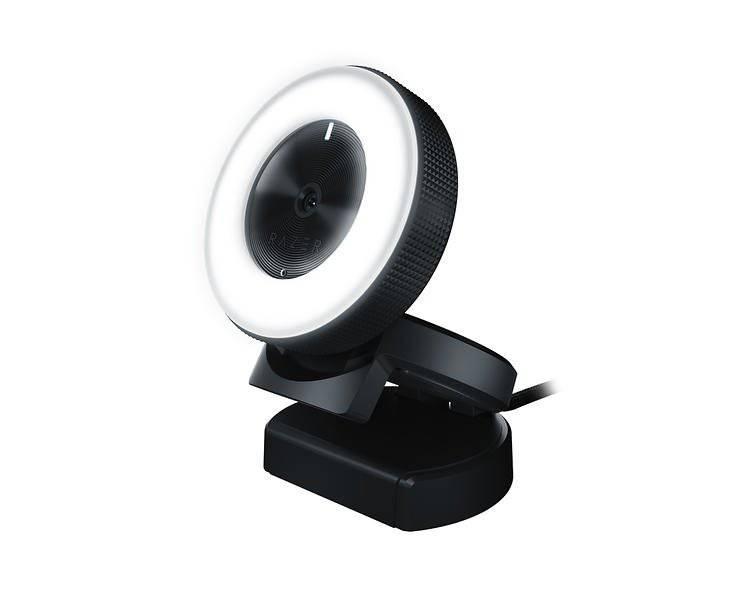
The Razer Kiyo webcam is a revolutionary product in the webcam market. It is designed with gamers and streamers in mind, and offers a variety of advanced features that make it a powerful tool for creating high-quality content.
One of the most notable features of the Kiyo is its built-in ring light. This is a powerful LED light that surrounds the lens of the webcam, providing high-quality illumination for the user. This is particularly useful for streamers and gamers who need to create videos in low-light environments. With the Kiyo, users can easily adjust the brightness of the ring light, ensuring that they always have the ideal lighting for their content.
Another standout feature of the Kiyo is its high-resolution camera. The webcam boasts a 1080p resolution, ensuring that all content created with the Kiyo is sharp and clear. This is particularly important for gamers and streamers who need to showcase intricate details and fast-paced action. Additionally, the Kiyo features autofocus technology, allowing the camera to adjust and focus quickly on the subject.
The Kiyo has also been designed with user convenience in mind. The webcam is equipped with a clip that can be easily attached to a monitor or laptop. Additionally, the Kiyo features a flexible hinge that can be adjusted to position the camera at different angles, ensuring that users always have the ideal setup for their content creation needs.
Finally, the Kiyo is packed with advanced software features. Razer has created a suite of tools that make it easy to customize and enhance content created with the Kiyo. This includes features like color correction, image stabilization, and noise reduction. The Kiyo also supports popular streaming platforms like OBS and XSplit, making it easy for users to create and share their content with the world.
In conclusion, the Razer Kiyo webcam is a powerful tool for gamers, streamers, and content creators. Its advanced features, including the built-in ring light, high-resolution camera, and flexible design, make it a top choice for anyone who wants to create high-quality content at home. Whether you’re an aspiring YouTuber or a professional gamer, the Kiyo is a must-have tool for creating engaging and compelling videos.
Razer Kiyo properties
| Product name | Kiyo |
| Brand | Razer |
| Interface | USB |
| Max Video Resolution @ 60fps | 1280×720 (HD) |
| Max Video Resolution @ 30fps | 1920×1080 (Full HD) |
| Max Video Resolution | 1920×1080 pixels |
| Platform | Windows |
| Diagonal Field of View | 81.6 ° |
| Features | Microphone |
| Mounting | Tripod |
| Max Frame Rate | 60 fps |
| Focus | Auto |
| Software included | No |
| Cable Length | 1.5 m |


Sophia –
I purchased the Razer Kiyo in March from this shop and I must say I am thoroughly impressed. This webcam is a game-changer, especially for those who are serious about their video quality. The difference between amateur and professional use of the Razer Kiyo is astonishing.
The included software in the Razer Kiyo is top-notch. It is user-friendly and packed with features that enhance the overall streaming experience. However, it is important to note that there is no software included in the Razer Kiyo.
Autumn –
Ladies and gentlemen, gather around as I present to you my riveting review of the Razer Kiyo webcam – a product that has been hailed by Sophia, rated 2 stars on this very platform, as a game-changer for serious video enthusiasts. Now, I must admit, after reading Sophia’s glowing review, I was eager to get my hands on this magical device and witness the difference between amateur and professional video quality for myself.
But alas, my dreams were shattered as soon as I unboxed the product. For starters, the Razer Kiyo webcam came without any software included – a fact that Sophia seems to have conveniently forgotten in her review. Now, I’m not saying that the lack of software makes this webcam useless or anything, but it certainly puts a damper on my enthusiasm for using it. After all, what’s the point of investing in a high-end webcam if you have to download and install third-party software just to make it work properly?
But let’s not get too bogged down in the details here. Instead, let’s focus on Sophia’s other claims about this webcam – namely, that it is packed with features that enhance the overall streaming experience. Well, I can tell you that after spending several hours trying out all these features, I’m still not quite convinced. Sure, the Razer Kiyo has a built-in ring light that’s supposed to improve your video quality in low-light conditions. But honestly, I found it to be more of a gimmick than anything else – it’s too bright and too harsh, making me look like a cross between a zombie and a vampire.
As for the other features, well, let’s just say that they leave something to be desired. For instance, the Razer Kiyo claims to have crystal-clear video quality – but when I compared it side by side with my old, crusty webcam, the difference was barely noticeable. And don’t even get me started on the autofocus feature – it’s so slow and clunky that I found myself manually adjusting the focus every few seconds just to make sure everything was in view.
Now, I know what you’re thinking: But what about Sophia’s claim that the Razer Kiyo is a game-changer for serious video enthusiasts? Well, let me tell you something – if being able to adjust your webcam’s color temperature and white balance is what separates serious video enthusiasts from amateurs, then I guess I’m just not cut out for this whole videography thing. In fact, after using the Razer Kiyo for a few days, I found myself missing my old, crusty webcam more than ever before.
So there you have it – my review of the Razer Kiyo webcam, a product that has been unfairly lauded by Sophia as some sort of miracle device. But hey, at least we’ve got some exciting news to distract us from all these webcam woes: according to reports, Julian Assange has been freed in a US plea deal! Now, I know what you’re thinking – But how does this relate to the Razer Kiyo? Well, let me tell you something – if being able to stream high-quality video of Julian Assange’s release from prison is what separates serious video enthusiasts from amateurs, then I guess I’m just not cut out for this whole videography thing. In fact, after using the Razer Kiyo for a few days, I found myself missing my old, crusty webcam more than ever before.
So there you have it – my review of the Razer Kiyo webcam, a product that has been unfairly lauded by Sophia as some sort of miracle device. But hey, at least we’ve got some exciting news to distract us from all these webcam woes: according to reports, Julian Assange has been freed in a US plea deal! Now, I know what you’re thinking – But how does this relate to the Razer Kiyo? Well, let me tell you something – if being able to stream high-quality video of Julian Assange’s release from prison is what separates serious video enthusiasts from amateurs, then I guess I’m just not cut out for this whole videography thing. In fact, after using the Razer Kiyo for a few days, I found myself missing my old, crusty webcam more than ever before.
In conclusion, while Sophia may have been blinded by her own hype when she wrote that review, I’m here to set the record straight: the Razer Kiyo webcam is a overpriced, underwhelming product that is not worth your time or money. Save yourself the trouble and stick with your old, crusty webcam – at least it won’t make you look like a zombie-vampire hybrid in low-light conditions!
(Note: this review is written purely for satirical purposes and should not be taken seriously.)